ARTWORK GUIDELINES
To ensure you get a great final product, take the time to prepare your artwork for printing following these guidelines. If you need assistance, Our creative department can help. We’re happy to take a look at your art.
PRINT READY FILE TYPES
1
FILE FORMATS
Vector Files – .ai .pdf .eps .svg
Raster Files – .psd .png .jpg
Raster Files must be 300dpi to print size or larger (resizing low dpi files to high dpi files does not work. Art must be created with a high dpi)
If you’re unsure about what you have, or need help converting your art into one of these formats, just let us know. Our creative department can help.
RASTER VS. VECTOR
2
THE DIFFERENCE
Screen Theory works with both vector and raster files, and it’s important to understand the difference.
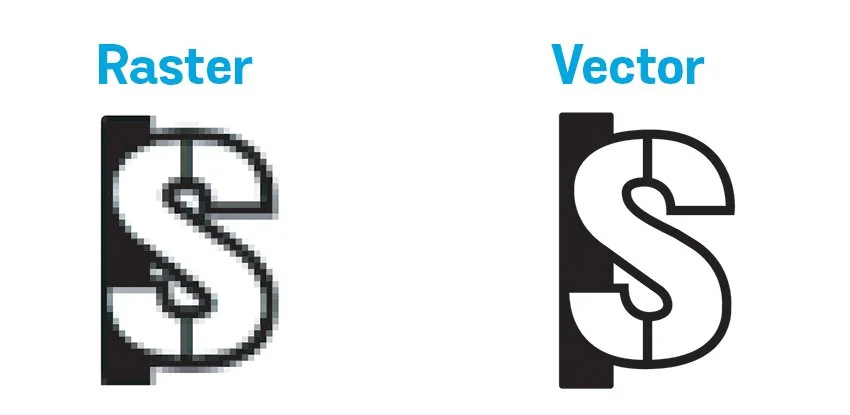
Vector files (like AI, SVG, or EPS) are made of paths and shapes, so they can be scaled to any size without losing quality. We typivally prefer this file type but know that’s not aways possible. (Please don’t Live Trace)
Raster files (like PNG, JPEG, or PSD) are made of pixels, which means they can lose clarity if resized. For raster artwork, we need the file to be at the exact size you want it printed or embroidered, and it must be 300 DPI or higher to ensure sharp, professional results. Lower resolution files can appear blurry or pixelated when printed, so starting with the right specs helps us deliver the best quality for your design.
CONVERT FONTS TO OUTLINES
3
CREATE OUTLINES
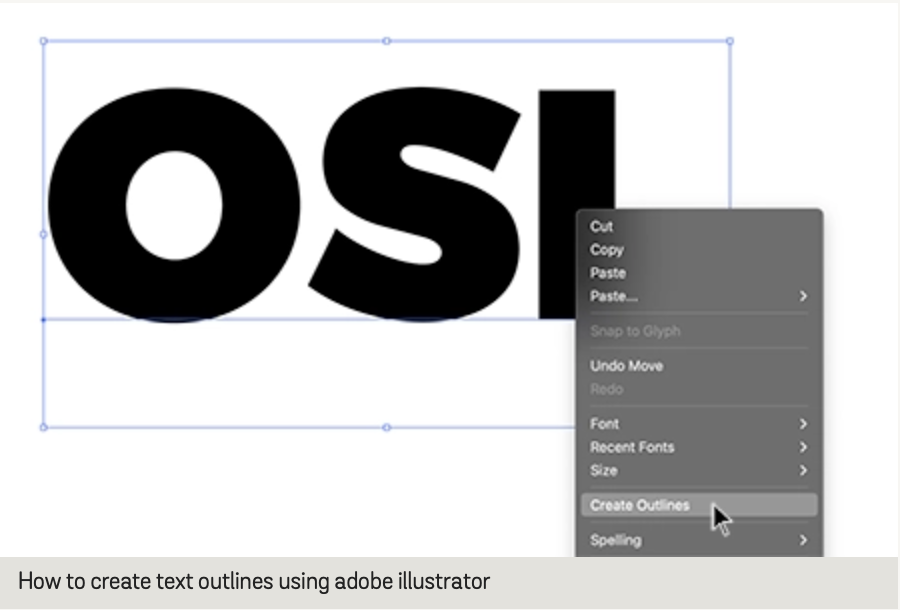
We are not able to use art that has “Live” fonts. This is because we most likely don’t have the font you used to create your art. But it’s a simple fix; In Adobe Illustrator, select your live text, right click and select “Create Outlines”. This ensures the fonts will print how they were intended. It’s possible to create outlines in other design programs as well, like Canva. You’ll just need to follow their specific prompts.
PANTONE COLORS
4
If you need us to make changes to the text, then we’ll need you to provide the .OTF or .TTF files.
ACCURATE REPRODUCTION
Screen Theory uses Pantone color matching for screen printing and Madeira thread colors for embroidery to ensure accurate, high-quality results. If you have access to those color books, great. If not, we’ll match your design as closely as possible. Every order includes a digital mockup for approval, but keep in mind that digital colors often differ from physical ones.
SIMULATED COLOR SEPERATIONS
5
FOR FULL COLOR
If you’re looking to reproduce photographic or full-color images, we must create either CMKY or simulated process separations. This is an additional cost from art time to screen setups to prepare the artwork for printing. both are charged per color, CMYK is 4-6 screens (depending on the garment color), while Simulated Process is typically 7-12 screen to reproduce an image.
FONT SIZES
6
MINIMUM PRINT SIZE
For the best results, check that your fonts are no smaller than 8pt and lines no thinner than 1 pt. Inverse art and negative space text need even larger sizes to print well. If your design has small elements, it’s helpful to print it out to size to ensure everything looks good when printed and legible from a distance.
MINIMUM EMBROIDERY SIZE
The smallest that can be embroidered is 0.2″ (5cm) tall. We may need to readjust your design to fit the parameters, but we’ll alway check with you first and get approval before we proceed.
CREATIVE SUPPORT
7
LET US HELP
From a sketch on a napkin to editing a photo for screen print, OSI can bring your ideas to life. If you don’t have artwork, or your art is not print-ready, our team can create or re-create for you at an hourly rate. Any artwork submitted that is not print ready may incur an hourly art charge. Learn more about our creative services.